How to stop your Discord messages appearing in Google Search


Key Points
- Discord is making messages from certain public channels discoverable through web search platforms from 16 November.
- Discoverable Servers will have server web pages generated from summaries from user conversations.
- Within these servers, messages sent in certain channels can be indexed by tools like Google Search.
- Admins will be able to control which channels are surfaced to the web, and users are able to opt out of their messages being indexed and used for server web pages.
- Thanks to the UK's data protection laws, users who have their region set to the United Kingdom are opted out by default.
Discord has announced that it will make chats in certain public servers surfaceable through web search platforms, with the goal of making Discoverable Servers easy to find.
Discoverable Servers are public Discord servers with at least 1,000 members whose admins have chosen to list them in Discord’s registry of public servers.
No invite link is needed to join these servers, and they can be searched on Discord’s Server Discovery page, and soon on Google, too.
Starting from 16 November, every Discoverable Server will have a server web page. If an admin does not set up a server web page by this date, their server will have a default page published for them based on their server profile.
This server web page will be surfaced to web search tools such as Google, and it will include automated summaries of active conversations actively happening in that server.
Discord said this feature will help people to find communities and discussions they are interested in, from speedrun tips to build optimisations for their favourite games.
“Prior to Discord’s launch, message boards were common, ranging from community-driven forums to official ones run by game studios. These message boards excelled at hosting long-form, structured conversations about helping people, theory crafting, and more,” Discord said.
“While they still exist today, many have moved into Discord servers. This has led to valuable information being locked in Discord conversations, inaccessible to the wider internet. We want to fix this.”
How to opt out of messages appearing in web searches
As a user, if you are a member of a Discoverable Server and you do not opt out, your messages from public channels will be used in conversation summaries in server web pages and in search results.
Opting it out is relatively straightforward. Navigate to your User Settings, and then to Data and Privacy. From there, turn off the option to show message content from Discoverable channels on web pages.
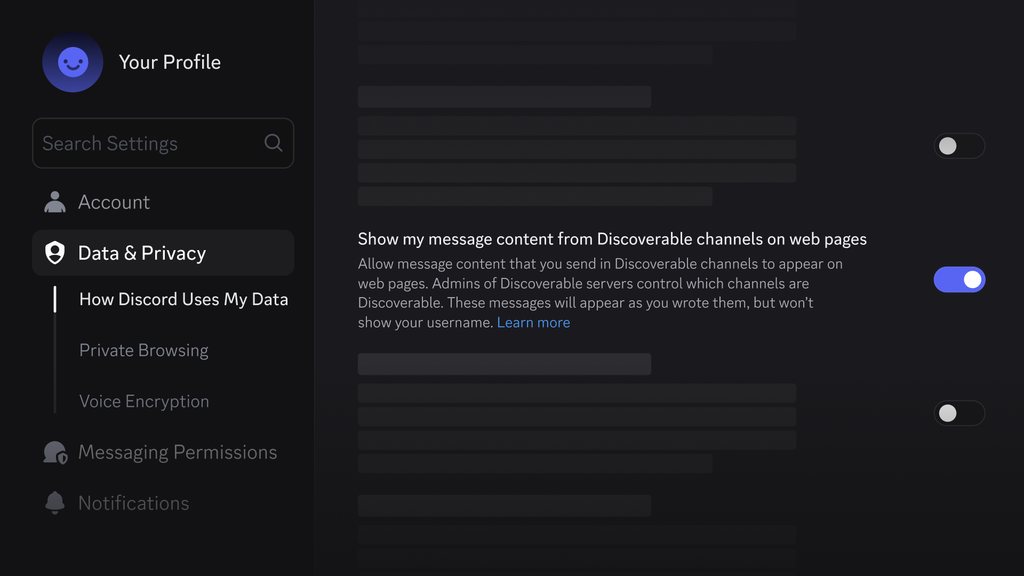
Discord said that channels where content may appear on the web will be labeled, so users will be aware before they send a message. Server admins are able to control which channels will be made available on the web.
The good news for data privacy advocates is that — thanks to the user data protections in the United Kingdom, as well as the EU, Brazil, Canada, Australia, and South Korea — users in these regions are opted out of having their messages appear in web searches by default.
Outside of these regions, Discord users will be opted in by default and will have to disable this functionality manually.
Server admins who do not want their server to appear in search are able to opt out by reverting their Discoverable Server to a Community Server.
They can do this by navigating to Server Settings → Access → Turn off Discoverable.
This will mean the server can no longer be found through Server Discovery and the server’s web pages are taken down, although they may still remain indexed by search engines for some time.