Starling launches rebrand – including new look, logo, and bank cards
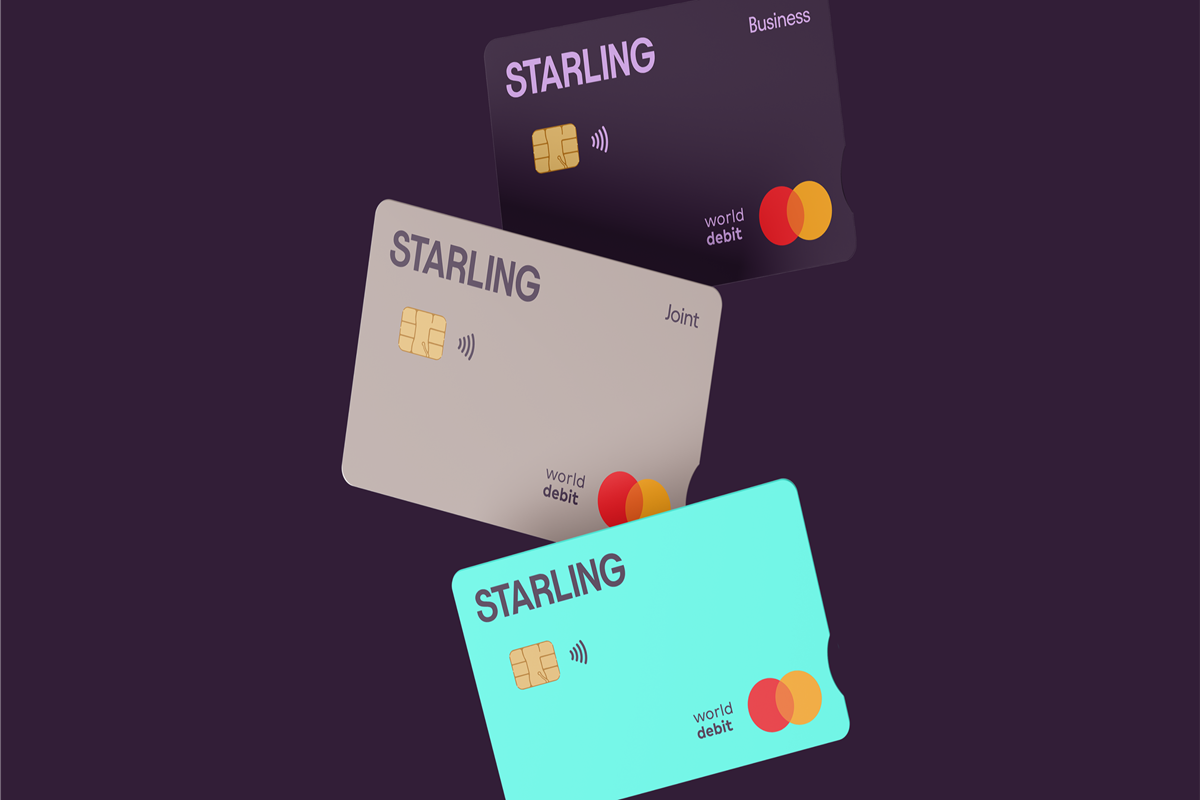

Starling has revealed major changes to its visual brand, with a new logo, colours, and card designs set to roll out to the bank’s app this week.
Some of the key changes include:
- New digital card designs are arriving in-app soon, with updated physical versions replacing expired cards from next year.
- More distinctive colours, including a richer purple and an electric teal.
- Dropping ‘bank’ from its logo – it’s now jsut called ‘Starling’.
- A modernised app icon, with fresh spending category icons and new fonts.
The changes rollout alongside a new slogan – be ‘Good with money’ – with every aspect of the bank’s visual identity, app and customer experience designed to encourage customers to take action over their finances, and to rethink how they budget, spend, and save.
Personal Account customers will be able to use the updated teal cards in their mobile wallets in the coming weeks, while Joint Account cards will switch from green to taupe, and Business and Sole Trader Account cards will switch from dark blue to aubergine.

Starling’s updated physical cards will be available from February 2026 to new customers and those requiring new cards.
Banking app changes
Some of the changes which will be launched in the banking app include:
- Tax-free allowance: Starling has launched a Cash ISA product to help customers make the most of their £20,000 tax-free ISA allowance. The ISA is currently being tested by some customers and will be rolled out to all in the coming months.
- Superbudget – and earn interest: Starling’s popular Easy Saver product will soon evolve to include a much-requested feature: Spaces. Instead of accruing interest on funds within one Easy Saver Space, customers will be able to break down their Easy Saver into multiple Spaces, so they can separate their savings for ‘Holiday’, ‘Dream house’ and ‘Emergency fund’ while earning interest on them all.
- Perfect your payday routine: Starling will soon launch a much-requested feature; scheduled internal transfers to Easy Saver. This will allow customers to automate their payday routine and set savings aside before being tempted to spend.
- Manifest that trip: Already live for those with an iPhone 15 Pro and above, customers can now personalise their Spaces with custom images, generated by AI. Saving for a holiday? Type in ‘beach in Margate’ and then ask the AI to superimpose an image of yourself there. Saving for a wedding? Type in ‘wedding at Westminster Abbey.’ The possibilities are endless.
“We’re busy building new features that will help our customers take action over their finances, whether that’s checking in with their bank balance more often, analysing their spending patterns, or making the most of their savings,” said Harriet Rees, CIO at Starling.